
Optimize Campaigns with Ad Manager Custom Values
Custom Values in Ad Manager: A Faster Way to Build Reusable Ad Campaigns
Creating ads for multiple businesses, locations, or sub-accounts can quickly become repetitive. Agencies often use the same campaign structure repeatedly but still need to manually update details such as the business name, city, phone number, support email, service area, or offer.
HighLevel’s new Custom Values in Ad Manager ad copy feature helps solve that problem.
With this update, users can now insert saved Custom Values directly into supported ad copy fields across campaigns on Meta, Google, and LinkedIn. This makes it easier to create reusable campaign templates, reduce manual errors, and launch ads faster.
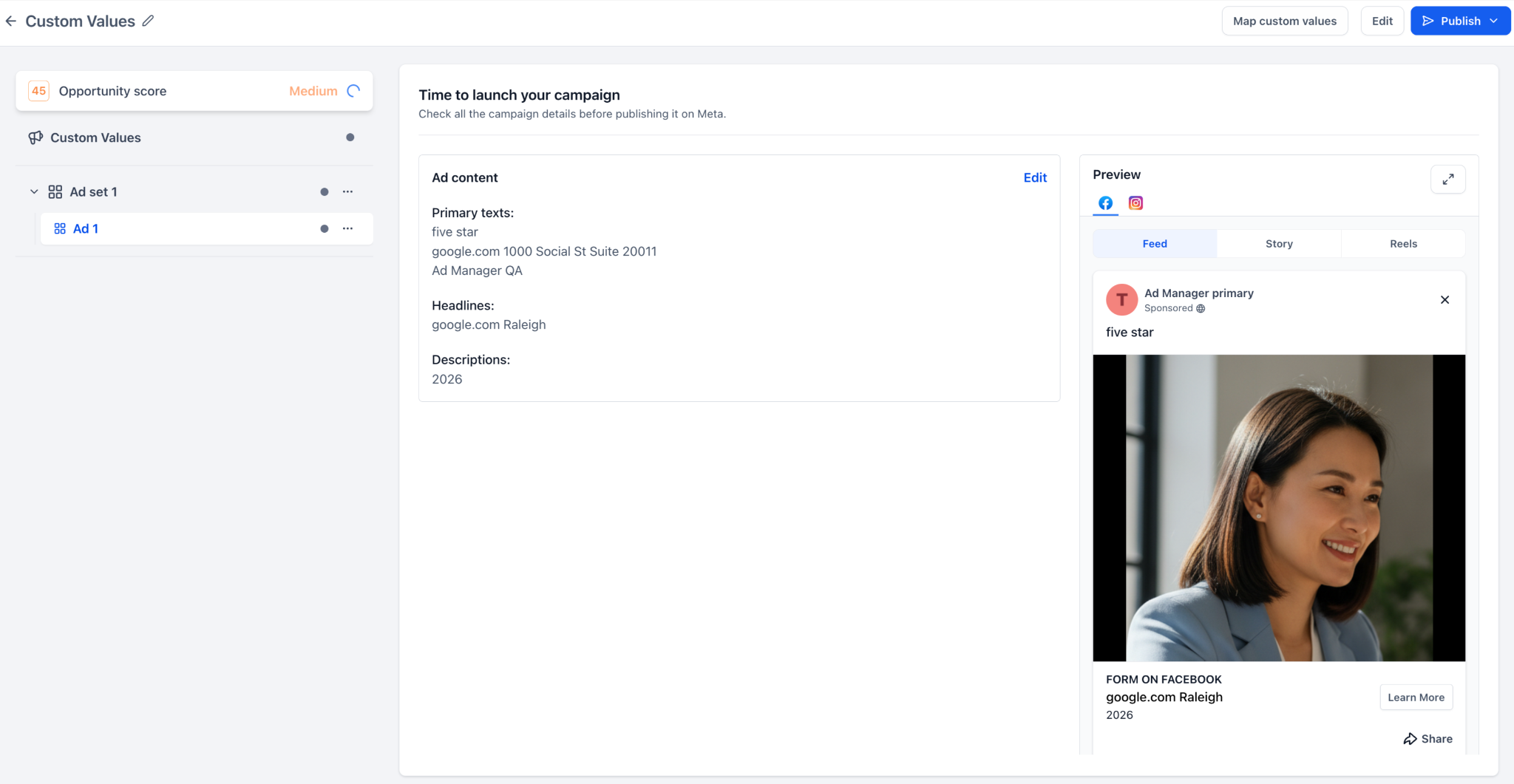
What Are Custom Values in Ad Manager?
Custom Values are reusable placeholders that automatically pull in saved business-specific information.
For example, instead of manually typing a business name or city into every campaign, you can insert a Custom Value such as:
{{ custom_values.business_name }}{{ custom_values.support_email }}{{ custom_values.city }}{{ custom_values.offer_name }}
When the campaign is reviewed or published, HighLevel resolves the Custom Value and shows the final ad copy with the correct information.
This is especially useful for agencies that manage campaigns across multiple sub-accounts.
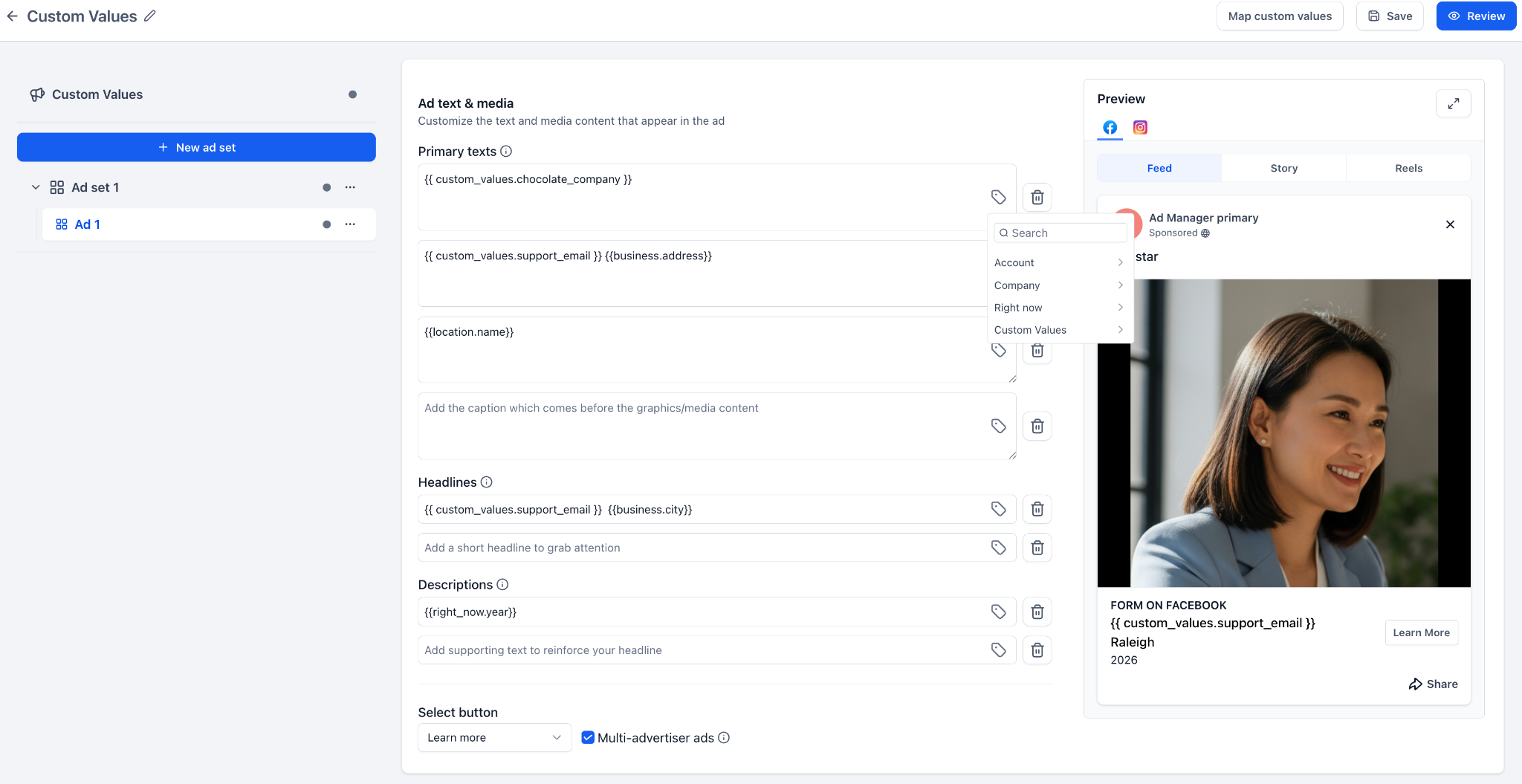
What’s New?
HighLevel now supports Custom Values inside eligible ad copy fields for:
Meta campaigns
Google campaigns
LinkedIn campaigns
Users can add Custom Values to fields such as:
Primary text
Headlines
Descriptions
Introduction text
Other supported copy fields
A new Custom Values picker allows users to search for and insert the correct value directly while building the ad. This helps keep campaign creation simple and organized.
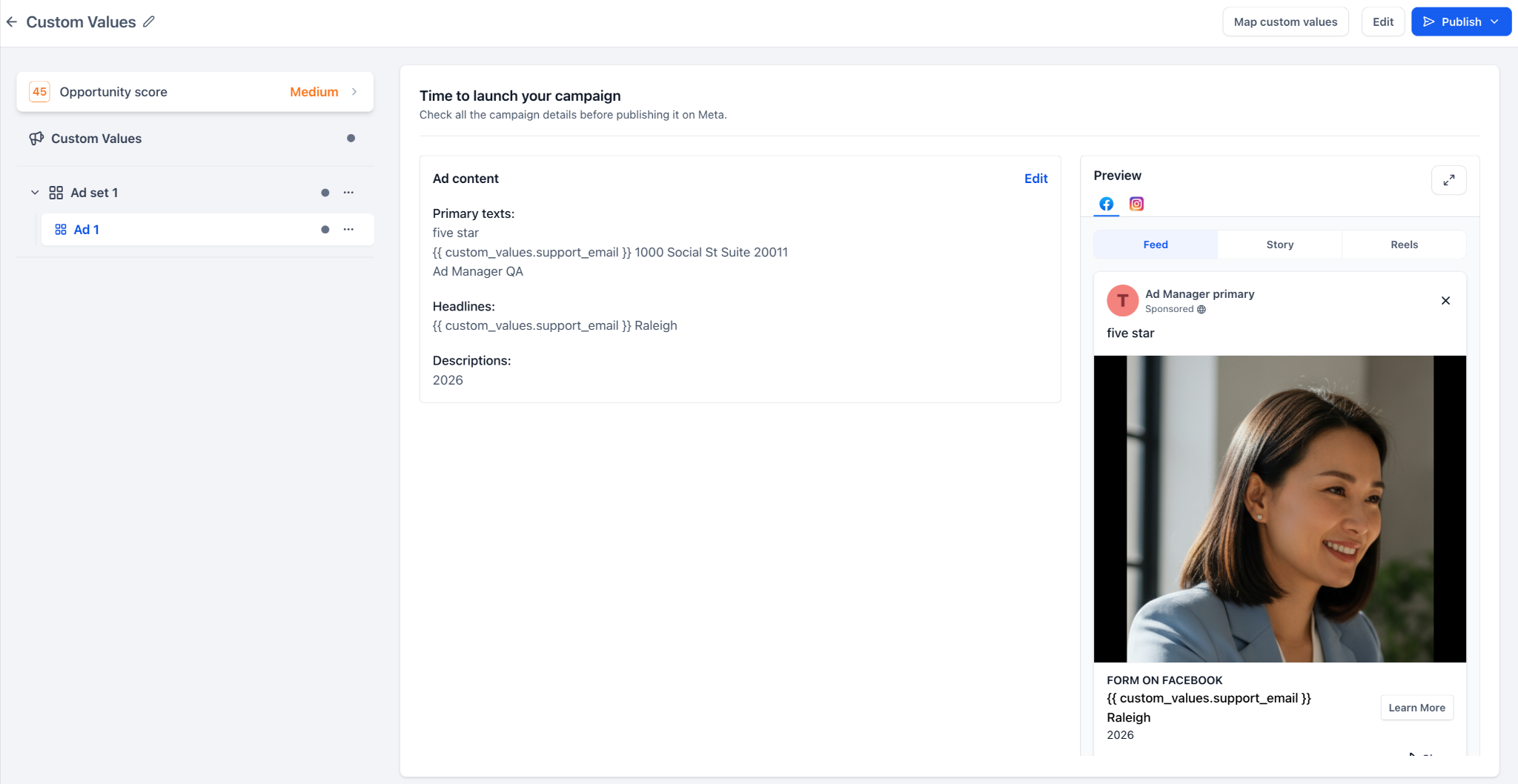
Map Custom Values Before Publishing
One of the most helpful parts of this update is the new Map custom values option.
Before publishing, users can review any Custom Values used in the campaign. If a value is missing, empty, invalid, or needs updating, it can be mapped before the campaign goes live.
This gives users more control and reduces the chance of publishing ads with broken placeholders or incorrect information.
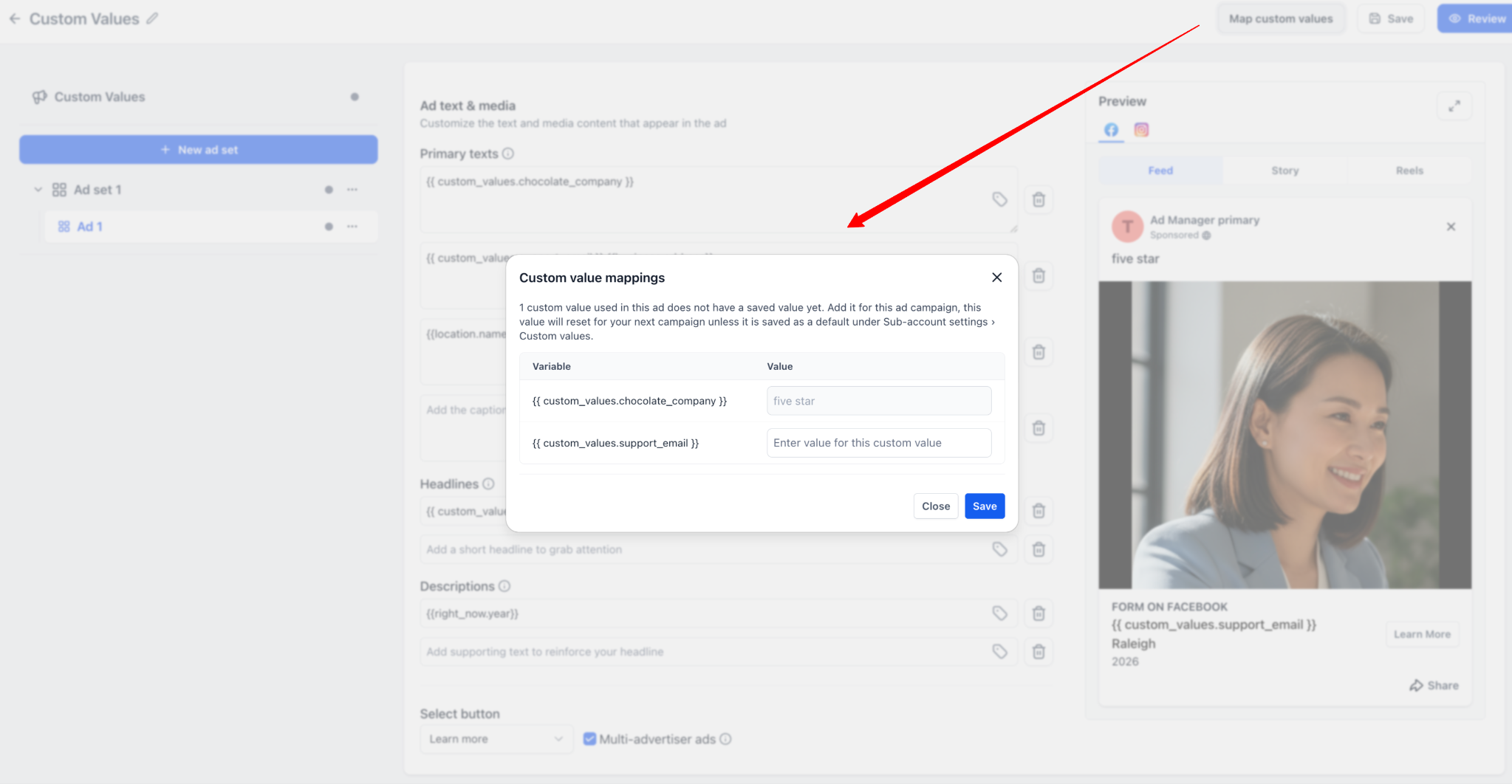
Resolved Preview Makes Review Easier
Previously, placeholder values could make it difficult to know exactly how an ad would appear after publishing.
Now, the preview and review screens show the final resolved copy. This means users can clearly see the actual ad text before the campaign launches.
For example, instead of seeing:
{{ custom_values.support_email }}
The preview can show the actual email address or value connected to that campaign.
This makes final campaign checks easier, especially when working with multiple clients or locations.
Built-In Validation Helps Prevent Errors
The update also includes validation to help prevent publishing issues.
HighLevel can now alert users when a Custom Value is:
Missing
Empty
Invalid
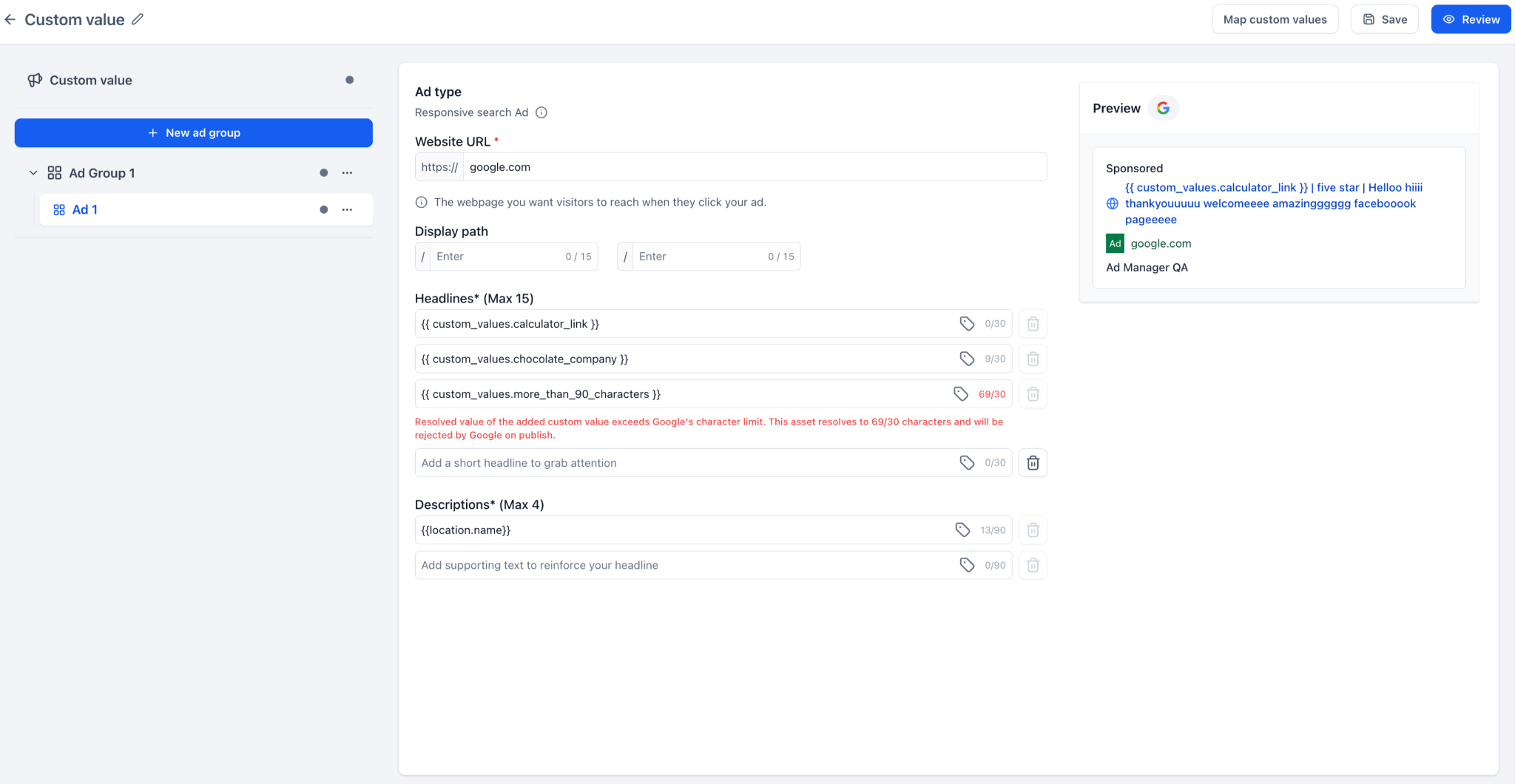
Too long for the platform’s character limit
This is especially important for Google Ads, where headlines and descriptions have strict character limits. If a Custom Value resolves into text that is too long, the system can warn the user before the campaign is published.
Why This Feature Matters for Agencies
For agencies, this feature is a major workflow improvement.
Many agencies build similar campaigns for different clients or sub-accounts. The structure may stay the same, but the business details change. Without Custom Values, teams have to update each piece of copy manually every time.
That creates extra work and increases the risk of mistakes.
With Custom Values in Ad Manager, agencies can now:
Build reusable ad templates
Launch campaigns faster
Keep ad copy more consistent
Reduce manual copy-paste errors
Personalize campaigns for each sub-account
Review final ad copy before publishing
Avoid errors caused by missing or invalid values
This makes campaign management smoother, especially for teams running ads at scale.
Where Custom Values Are Not Supported
Custom Values are currently supported only in eligible ad copy fields.
They are not supported in:
URL fields
CTA dropdowns
Lead form selectors
Media upload fields
Targeting settings
Budget settings
Bid strategy fields
This means users can use Custom Values for ad messaging, but not for every campaign setup field.
Important Note After Publishing
Updating a Custom Value after an ad has already been published will not automatically update the running ad.
If a value changes after publishing, the campaign must be updated and republished for the new value to take effect.
This is important to remember when managing offers, phone numbers, support emails, or other details that may change over time.
Final Thoughts
The new Custom Values support in Ad Manager is a strong update for agencies and businesses that create repeatable ad campaigns.
It helps reduce repetitive work, keeps ad copy consistent, and makes campaign templates more powerful across Meta, Google, and LinkedIn. The ability to map missing values, preview resolved copy, and catch validation issues before publishing adds an extra layer of safety and confidence.
For agencies managing multiple sub-accounts, this feature can save time, reduce errors, and streamline campaign launches.


